
Last week, we looked at what Tomcat is, and what it does for Summit. When you actually come to work with Tomcat, it is initially very frustrating as configuration files and logs seem to be scattered all over the place, and you spend a lot of time looking in the wrong place for an error message. Let’s have a look at where everything is, and the logic behind it.
The Important Bit
Really – this bit is important. When you understand it, a lot of the confusing file layout stuff will make sense. The Tomcat process is a bit like this…
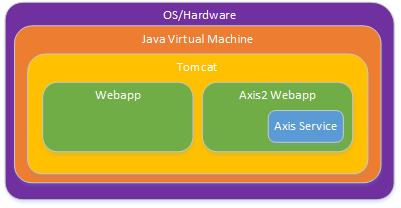
Everything is like an onion, with the outer elements responsible for loading, unloading and configuring the layer immediately inside it. If you know what each layer does, you can head to the right place to find the correct log or configuration file. Essentially Tomcat files and logs sit inside a folder in the Operating System. Webapps sit inside a directory inside the Tomcat directory, and if you have Axis2 services, these sit inside folders inside the Axis2 webapp folder, inside the webapps folder, inside … (you get the idea). If you know what functionality each layer provides, that should give a pretty good clue about where you should look to find the configuration setting you need.
File Structure
As a result, the directory structure inside a Tomcat folder looks a lot like this
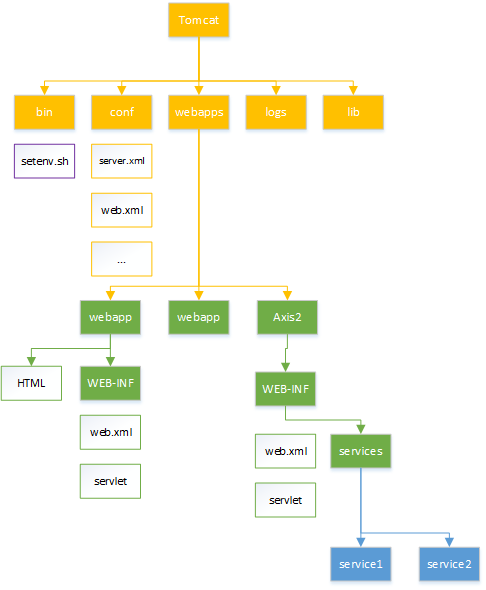
and you can see that each webapp has its own little set of folders within the Tomcat webapp directory. Each webapp folder must contain a WEB-INF folder with the servlet code and configuration. Tomcat expects to find the configuration in WEB-INF/web.xml.
Now have the high level layout, here’s the quick guide to what to look for where. CATALINA_HOME is the directory where Tomcat is installed.
| Layer | Function | Top Level Directory | Config Location | Log Location |
|---|---|---|---|---|
| Java Virtual Machine | Memory management | $JAVA_HOME | $CATALINA_HOME/bin/setenv.sh | none |
| Tomcat | Web Server | $CATALINA_HOME | conf | logs |
| WebApp | HTML Request Servicing | $CATALINA_HOME/webapps/webapp-name | WEB-INF/web.xml | WEB-INF/ |
| Axis Service | SOAP Request Servicing | $CATALINA_HOME/webapps/Axis2/services/service-name | conf | logs |
The log locations can be overriden in the relevant config, but the locations provided are the default, and where you should be looking. I find that if I have some sort of problem, I end up looking in every log file, which is a bit frustrating – but not nearly as frustrating as looking at nearly every log file except the one with the message you need!
What Needs Configuring
There’s a number of configuration settings you’ll need to configure to get things running, and the distributed components guide will have more detailed explanations of the exact settings for each webapp, in a somewhat different order. Here’s the important things that you’ll have to check and configure to get up and running.
- Operating System [Configuring the OS/Hardware]
- Automatic start of the tomcat process, in Services (Windows) or init.d (Solaris/Linux) or whichever replacement for init.d Solaris and Linux are using this week
- Environment variables
$JAVA_HOME,$JRE_HOMEand a suitable$PATHsetting so that binaries can find the Java Runtime. - Environment variable
$CATALINA_HOMEand maybe$CATALINA_BASEso you can find where Tomcat is.
$CATALINA_HOME/bin/setenv.sh[Configuring the JVM]- Overrides of
$JAVA_HOMEif you don’t want to use the default system Java runtime - Command line options for the JVM, especially
-Xmxand-Xms, which control memory usage - Any arguments you want to pass to the Tomcat command line.
- Overrides of
$CATALINA_HOME/conf/server.xml[Configuring Tomcat]- Settings relating to the web serving, especially configuring which TCP ports to listen on, are we using encrypted (SSL) connections and/or unencrypted
$CATALINA_HOME/webapps/<webapp_name>/WEB-INF/web.xml[Configuring the Webapp]- Settings specific for <webapp_name>. This will vary depending on the app, but mostly settings to tell you where other parts of the Summit Application can be found
- Location of Summit Naming Service
- Hostname/Port/Username/Password for any database that the webapp is using ( SMT / SNS ? )
- Webapp Log locations
- Session timeouts
- Settings specific for <webapp_name>. This will vary depending on the app, but mostly settings to tell you where other parts of the Summit Application can be found
Axis2 services are going to have similar settings to other webapps. We will discuss Axis2 in another post.
There is much, much more that you can change, but the defaults will get you started until you feel like taking on the Tomcat documentation for yourself.
More Reading
The official Misys process for setting all this up is in the Distributed Components Guide. The Tomcat documentation does have all of the configuration settings that are supported, but is a little bit hard to read if you don’t have a basic idea of how everything fits together.