Challenging the specification

A few years ago, I was the technical lead on a project to decommission another front office system and consolidate it onto Summit. One of the developers, who was working on a DS-API interface to replace the old system’s feed down to the settlement system came to me with a problem: The feed should be a relatively straightforward trade feed, but he’d been sent a spec where the state transition diagrams for the trades would need to be extended with extra modes and transitions and the interface would need to re save the trade in Summit. It all seemed a bit over the top, and the developer had questioned it but the analyst who had come up with the design was adamant it was required.

I called the analyst

“I’ve just seen your spec for the state transition diagram changes for the back office feed. It looks a bit complex. Can you explain why we need extend the State Transition Diagrams to support this interface? And why does the interface need to re save the trades?”

“We send the trades to an external agency for settlement. They charge for every message we send them. We don’t want to send them a message for every trade save, only when something changes that affects back office processing”

This makes sense, and is a perfectly reasonable business requirement. We can do this..

“So when the settlement staff save a trade, they need two types of save – a “send to back office” save and a “don’t send” save, so we need to add those actions to the State Transition Diagram. The feed should only pass the “send to back office” saves down to the settlement agency, and then save the trade back to verified in Summit.”

Now we have a functional specification telling us how to fulfill the business requirement. Extending the state transition is a load of extra work, requiring database meta releases, core rebuilds and GUI changes. We want to avoid this if we can, as there are far easier ways to do this. How did the analyst come up with this design?

“Is this how the old system worked”

“Yes”

There’s the answer. When writing the specification for the feed, the analyst has made the mistake of writing down ‘how the old system works’, not ‘what the old system does’. For an analyst familiar with the old system, this is the easiest thing to write down, but it’s not what we need.  This a common problem when you are replacing existing software, and as a developer you need to watch for it.

If you have a business requirement, very often the old system and Summit will naturally handle it in different ways. To get a good design, you need to start with the ‘what it does’ business requirement, and then create the ‘how it does it’ functional specification. The functional specification for the old system may be relevant, but don’t be afraid to throw it away if a different approach is simpler or better. Trying to make Summit do back flips so it works the same way as the old system is a waste of time, and often destroys much of the efficiency benefits that come from moving to a new platform. We don’t actually have the full business requirement, we’ve got a functional specification for the old system. Let’s get the full requirement…

“Do the settlement team have a set of rules about when the trade should be ‘sent to back office’, or do they do something random like flip a coin?”

“They have a list of fields that are relevant for the back office. If those change they ‘save for back office'”

I thought so. Summit can handle this quite easily by doing an entity comparison in the feed between the current and previous version – then only send trades that have relevant fields changed.

“Could we have the feed check those fields, against the previous version of the trade and only feed the trades where they have changed?”

“Yeah, you could do it that way”

“I think we will. Can you send us a list of the fields that need to be checked?”

A short conversation, but what we’ve done is focused in on what needs to be done, and come up with a better approach to how we are going to do it. The new functional approach is much better for two reasons:

  1. the code is all one binary so we don’t need to fiddle around making state transition changes, GUI changes and trying to implement database releases. It’s going to be faster to implement.
  2. the send/don’t send decision is now fully automated, so there is no possibility of user error saving the trades. The new feed will be better than the old one.

The developer had tried to have the same argument, of course, but had been shot down. So it goes…




5 Questions For Evaluating Summit Archiving Solutions

Without some form of maintenance, Summit databases will always grow. The application maintains an audit history of most data, so it is never removed; it just gets new versions. Even unaudited data is rarely deleted, just replaced. The effect is a consistent growth that frustrates Database Administrators, and scares the bean counters. Buying enterprise class, mirrored disks for a primary database, the multiple copies of the primary database and dump space is not cheap.

The solution is to remove some of the data that lives in the primary database. This is a scary proposition for users, who naturally hoard data ‘just in case’. Just throwing company data away is generally banned by most regulators, who need at least ten or fifteen years of history to be available. Any data that is archived from the primary database will need to be accessible somewhere.

With this in mind, here are five key questions about your archive requirements that you should answer before you start to evaluate any solutions:

1. What do I absolutely have to keep online?

Obviously some data can’t be deleted, or the system will break. You’ll need to keep live deals and market data online, but are deals that were cancelled 5 years ago still processed every day? Do you need to retain all 132 versions of that customer record in your main database?

2. How long do Auditors/Regulators require you to retain data?

This is likely to be somewhere between 7 and 15 years. Different jurisdictions will have different rules, and you’ll need to look at all of the territories that you operate in.

3. How quickly do you need to access archived data?

When the auditors request an extract, how fast do you need to be able to access the data. Do you want instant access, or can you wait a few days for tapes to make their way back from storage and be brought back online. Some regulators require that the data is available in the main trading system

4. How will you access the archived data?

If the data is in a database dump, will you have the software available to load the dump? If you converted from Sybase to Oracle 5 years ago, can you load dumps from 8 years ago? Are you looking to run FusionCaptial Summit against the dump – if so, will you have a suitable application server and software code available? If you are archiving to a separate database, or flat files, do you have software to read the data, or will you write it when you need it.

5. What does Storage cost?

To evaluate any immediate cost savings, you should have a pretty good idea of what it costs to keep data online. For organisations with outsourced IT infrastructure, the cost is often pretty easy to calculate – it will probably priced at a ‘per gigabyte, per month’ rate, with the rate varying depending on how fast/resilient the storage is.


If you have answers to these questions, you can evaluate options for archiving your data. Quite a few solutions may be rejected immediately, since they don’t fulfill an absolute requirement from users or regulators. Knowing what your storage costs are will let you set a budget for implementing any solution.

I would argue that the System Elegance archiver is a pretty good option ( but that shouldn’t be a surprise! ).

Tomcat Configuration – Where is it?

Last week, we looked at what Tomcat is, and what it does for Summit. When you actually come to work with Tomcat, it is initially very frustrating as configuration files and logs seem to be scattered all over the place, and you spend a lot of time looking in the wrong place for an error message. Let’s have a look at where everything is, and the logic behind it.

The Important Bit

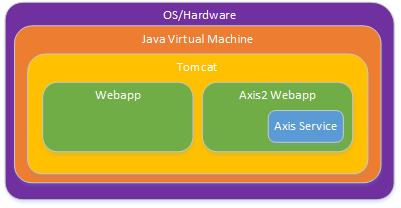
Really – this bit is important. When you understand it, a lot of the confusing file layout stuff will make sense. The Tomcat process is a bit like this…

Tomcat file layouts

Everything is like an onion, with the outer elements responsible for loading, unloading and configuring the layer immediately inside it. If you know what each layer does, you can head to the right place to find the correct log or configuration file. Essentially Tomcat files and logs sit inside a folder in the Operating System. Webapps sit inside a directory inside the Tomcat directory, and if you have Axis2 services, these sit inside folders inside the Axis2 webapp folder, inside the webapps folder, inside … (you get the idea). If you know what functionality each layer provides, that should give a pretty good clue about where you should look to find the configuration setting you need.

File Structure

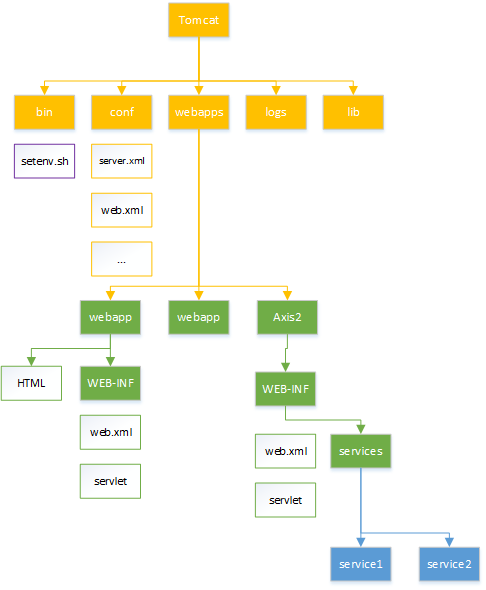
As a result, the directory structure inside a Tomcat folder looks a lot like this

Tomcat file layouts2

and you can see that each webapp has its own little set of folders within the Tomcat webapp directory. Each webapp folder must contain a WEB-INF folder with the servlet code and configuration. Tomcat expects to find the configuration in WEB-INF/web.xml.

Now have the high level layout, here’s the quick guide to what to look for where. CATALINA_HOME is the directory where Tomcat is installed.

Layer Function Top Level Directory Config Location Log Location
Java Virtual Machine Memory management $JAVA_HOME $CATALINA_HOME/bin/setenv.sh none
Tomcat Web Server $CATALINA_HOME conf logs
WebApp HTML Request Servicing $CATALINA_HOME/webapps/webapp-name WEB-INF/web.xml WEB-INF/
Axis Service SOAP Request Servicing $CATALINA_HOME/webapps/Axis2/services/service-name conf logs

The log locations can be overriden in the relevant config, but the locations provided are the default, and where you should be looking. I find that if I have some sort of problem, I end up looking in every log file, which is a bit frustrating – but not nearly as frustrating as looking at nearly every log file except the one with the message you need!

What Needs Configuring

There’s a number of configuration settings you’ll need to configure to get things running, and the distributed components guide will have more detailed explanations of the exact settings for each webapp, in a somewhat different order. Here’s the important things that you’ll have to check and configure to get up and running.

  • Operating System [Configuring the OS/Hardware]
    • Automatic start of the tomcat process, in Services (Windows) or init.d (Solaris/Linux) or whichever replacement for init.d Solaris and Linux are using this week
    • Environment variables $JAVA_HOME, $JRE_HOME and a suitable $PATH setting so that binaries can find the Java Runtime.
    • Environment variable $CATALINA_HOME and maybe $CATALINA_BASE so you can find where Tomcat is.
  • $CATALINA_HOME/bin/setenv.sh [Configuring the JVM]
    • Overrides of $JAVA_HOME if you don’t want to use the default system Java runtime
    • Command line options for the JVM, especially -Xmx and -Xms, which control memory usage
    • Any arguments you want to pass to the Tomcat command line.
  • $CATALINA_HOME/conf/server.xml [Configuring Tomcat]
    • Settings relating to the web serving, especially configuring which TCP ports to listen on, are we using encrypted (SSL) connections and/or unencrypted
  • $CATALINA_HOME/webapps/<webapp_name>/WEB-INF/web.xml [Configuring the Webapp]
    • Settings specific for <webapp_name>. This will vary depending on the app, but mostly settings to tell you where other parts of the Summit Application can be found
      • Location of Summit Naming Service
      • Hostname/Port/Username/Password for any database that the webapp is using ( SMT / SNS ? )
      • Webapp Log locations
      • Session timeouts

Axis2 services are going to have similar settings to other webapps. We will discuss Axis2 in another post.

There is much, much more that you can change, but the defaults will get you started until you feel like taking on the Tomcat documentation for yourself.

More Reading

The official Misys process for setting all this up is in the Distributed Components Guide. The Tomcat documentation does have all of the configuration settings that are supported, but is a little bit hard to read if you don’t have a basic idea of how everything fits together.


Header Image

Tomcat : What is it?

One of the key changes in the Summit V6.0 architecture we explored in the last couple of posts was that webapps and Tomcat are going to become significantly larger and more important part of the Summit infrastructure. It’s important for system stability and performance to get the deployment right, so we’ll start in this post by understanding what Tomcat does.

The Apache Tomcat website gives us a one sentence description:

The Apache Tomcat® software is an open source implementation of the Java Servlet, JavaServer Pages, Java Expression Language and Java WebSocket technologies.

If you are none the wiser after reading that, don’t worry – I’ll explain it. I’ll assume that you already understand what open source software is, but  Java Servlet, JavaServer Pages, Java Expression Language and Java WebSocket technologies are going to need some explanation.

Background – A problem to solve

Back around the turn of the millennium, the internet was just taking off. The earliest web servers were designed to serve static content to web browsers. You stored a pile of .html and .gif files in a suitable directory, and your NCSA web server would send these files back to the browser as it requested them.

Static is fine for some content, but especially in the corporate world, the data that needs presenting is ever changing , so you need the ability to generate content dynamically. Back then, your options were limited, somewhat inflexible and slow. I remember generating dynamic content using Perl and cgi-bin in 1997, which did the job I needed – which was to add a corporate theme around some legacy system documentation, but was not particularly performant. CGI allows the web server to run an external program to generate a response, but the since the that program was loaded and launched for every web request, high volumes of traffic could quickly overload a server.

Inside an enterprise, if you wanted your browser to interface to your line of business applications, CGI was inadequate, and you needed something more.

Java EE – A solution

Nowadays, there are dozens, if not hundreds of viable solutions to generating dynamic web content, with different programming models, languages, feature sets and performance.

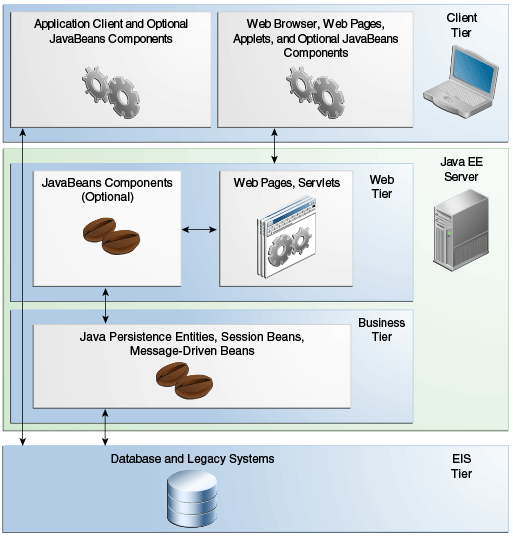
Sun released Java Enterprise Edition – JavaEE for short, on December 12, 1999. JavaEE provides an architecture and a family of protocols and technologies aimed at enterprises wanting to build Java applications. The reference implementation was written in Java, but alternative implementations of some of the protocols have been written in other languages. Java EE has an n-tier architecture, which is somewhat more sophisticated and complex than most dynamic frameworks, but which can map onto nearly any enterprise multi-tier client-server application.


Java EE architecture

Summit doesn’t need to implement the whole Java EE setup, but makes use of the ‘Web Tier’ part of the architecture.

Like the Business Tier and, to some extent, the Client tier, the Web Tier consists of one or more containers. Tomcat is a Web Container.


The Web Tier

The Web Tier servers can be accessed via HTTP – and HTTP is very widely supported; not just by every web browser but also in client libraries for just about every programming language. This makes them ideal for implementing services which can be called remotely by a range of clients. Business Tier servers have more sophisticated and flexible programming models, but are only really supported by Java clients.

A Java EE Web Container has a list of 25 APIs to support. There two ‘key’ APIs : Java Servlet and JavaServer Pages and the remaining 23 – including Java Expression Language and Java Websockets — we will call ‘secondary’ and ignore for a moment.

There are at least a dozen other software packages that serve the same Web Container function – Summit supports Tomcat, IBM’s Websphere and Oracle’s Weblogic but Tomcat is used in every Summit installation I’ve seen because it is free, open source and distributed by Misys along with Summit.

A Servlet is a special Java class that implements the javax.servlet.Servlet interface. Servlets implement a request/response architecture – ie. you send the servlet a request, and you get a response back. The web container knows how to load Servlets, and can forwards requests onto them.

JavaServer Pages (JSP) is an alternative programming model where you write HTML pages and embed Java code inside them. The Web Container runs the embedded Java code to generate the dynamic HTML content before sending the results back to the client. Java Expression Language ( EL ) is a secondary API used by JSP to communicate with the business logic tier.

JSP and EL are irrelevant to us though, since all of the Summit webapps use the Servlet technology.

Servlets

The Servlet interface is pretty simple, and a Servlet has a simple life.

  1. The container loads the Servlet, and calls the servlet’s init() function for one time setup.
  2. For each client request, the container calls the servlet’s service() function, passing in the request parameters, and getting the response back.
  3. When the Servlet is not longer needed, the container calls the servlet’s destroy() method, and unloads it.

This request/response architecture maps very nicely onto the internet HTTP protocol, so in practice most servlets are derived from the javax.servlet.http.HttpServlet class. This class already provides a service() method, and programmers override methods corresponding to one or more of the HTTP verbs such as doGet().

Here’s a simple servlet that will respond to any request with a web page showing the current date

import java.io.*;
import javax.servlet.*;
import javax.servlet.http.*;

public class TimeServlet extends HttpServlet {

    public void doGet( HttpRequest request, HttpResponse response)
        throws ServletException, IO Exception
   {
       response.setContentType("text/html");
       Date now = new Date();
       PrintWriter out = response.getWriter();
       out.println("<h1>" + now.toString() + "</h1>");
    }
}

It’s not actually important that you understand this code. What is important is that these 14 lines of code are all I need to write for my web based dynamic time display application. Tomcat does the rest.

The role of Tomcat

Tomcat fills out the rest of the code that makes up the dynamic web application. It provides the code to handle

  • Opening a server socket to listen for HTTP
  • Parsing HTTP requests from clients, and making sure they are valid and requesting something that I provide
  • Switching over to WebSocket connections if the client requests it
  • Sending the correct status codes when things go wrong ( or right! )
  • Encrypting or decrypting HTTP traffic because we are using HTTPS
  • Handling multiple connections at the same time
  • Working out if a user should have permission to access my servlet
  • Loading, initialising and unloading servlets
  • Routing HTTP requests to the correct servlet
  • Packaging responses back to client over HTTP
  • Application logging

These are all common functions that any quality web server would need to support. It’s an awful lot of code to write yourself; the HTTP protocol itself has 3 versions (1.0,  1.1 & 2 ), a dozen or so verbs and over 50 different return codes to support for example. Having a widely used, heavily tested application framework to handle all that for you delivers greater stability and flexibility compared to rolling your own.

Now we know what Tomcat does : it’s a web server that allows me to generate responses with blocks of Java code.

Now you just need to configure it all to work for you – and that’s next weeks instalment…

Further Reading

If you want to know more about Java EE in general, the Oracle Java EE tutorial is a very good place to start. The Tomcat Website contains an overview of Tomcat and configuration documentation.

The End Of Classic : Part 2

Misys FusionCapital Summit version 6.0 has now been released. A new major version number means that that there has been a pretty major change in the architecture of the system : Version 3.0 brought the Straight Through Processing architecture, and Version 5.0 brought us Summit FT. The big change in version 6.0 is ‘The end of Classic’.

Last week, we looked at how the Summit GUI architecture changes in version 6.0. This week, we will look at the handling of Documents, Payments and the Straight Through Processing subsystem.

There’s only one way to do it

The STP architecture was introduced fully in version 3.0, providing an event driven architecture. Prior to this, Summit used a collection of driver programs to generate payments and documentation : Accounting driver in cash mode, incres_driver, swift_driver, payext_driver, bulk_dispatcher and friends. These all had equivalent services in STP : Expected Flow Server, Document Server, PreSettle Server, Settle Server, Dispatch Server. Over time, many more services have been added to the STP architecture, and there are now a wide range of STP services – some of which are not related to documentation or payments at all.

In the same way that the pre V5.x GUI has been dropped in version 6.0, the pre V3.0 driver processes have now been dropped. You will now need to handle all document processing with STP services. Converting the old servers over isn’t technically too difficult, but you will need to retrain users to work in an STP environment, where they will need to process exceptions as an when they occur, rather than getting bulk drops of data when the relevant driver runs. There is much more flexibility in the STP approach, and from a user efficiency standpoint it’s by far the better approach. Dropping the old approach makes sense – as code no longer needs to be duplicated between two implementations of the same basic business requirement.

The End of Orbix

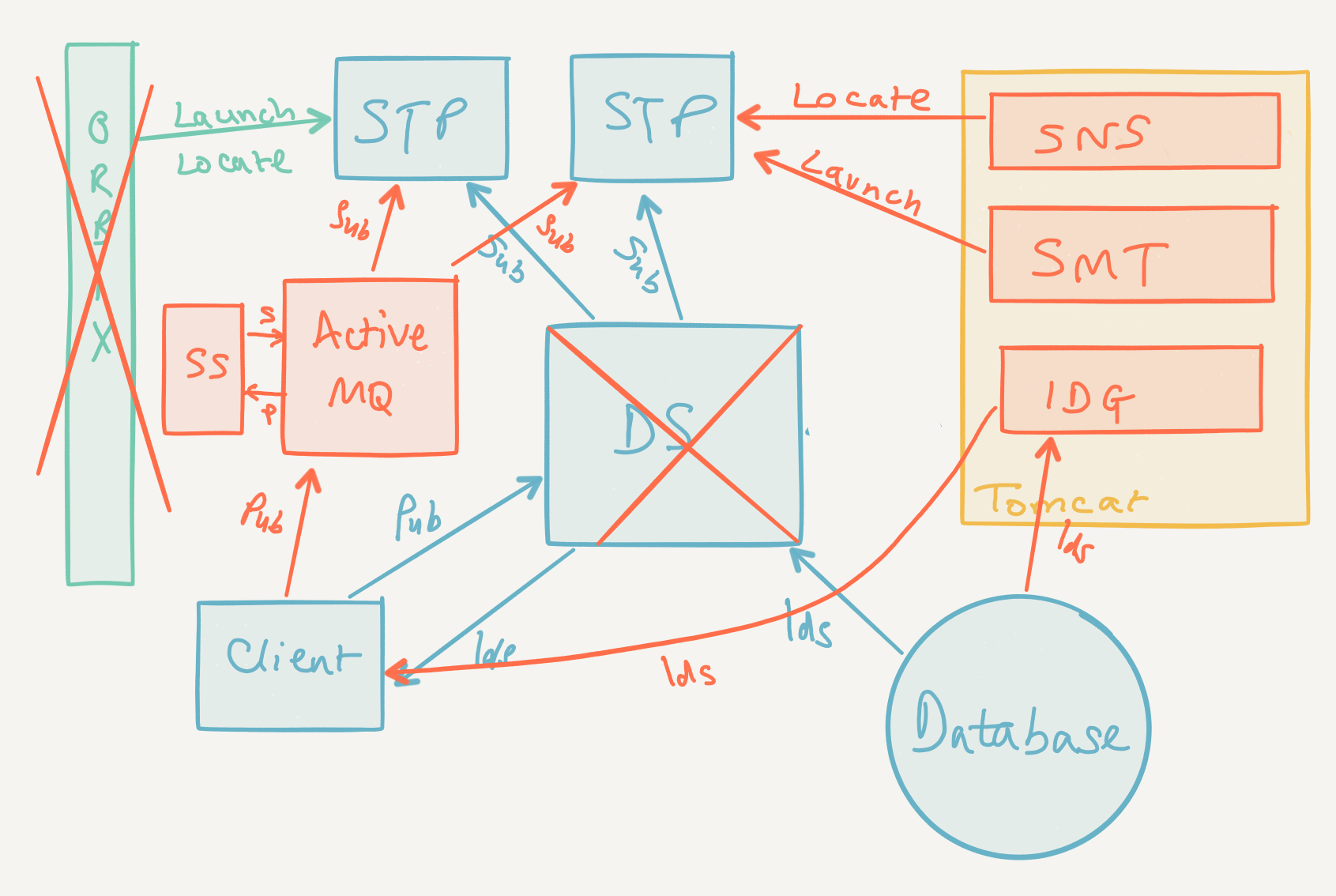
As I said last week, Orbix has been removed from V6.0. This leaves a bit of a gap, since Orbix provided a number of key features to STP servers:

  • A way for servers to find each other, via the itnaming_daemon
  • A way to start and stop servers remotely, using the itnode_daemon running on each machine
  • A communications protocol ( IIOP ) and libraries to allow inter server communication

I discussed the server location problem last week, and the solution is the Summit Naming Service, which runs inside Tomcat. This is a near drop in replacement for the itnaming_daemon.  The Summit Management Tool ( which I also touched on last week ) is now the way to start and stop servers remotely. Both of these technologies have been in Summit for the last few versions, and can be rolled out now.

A New Form Of Communication

This still leaves the problem of inter server messaging, and this has been solved by moving the messages over to the JMS 1.1 protocol. Misys now provide Apache ActiveMQ along with Summit to handle the routing of messages between servers. JMS is a well understood and widely used protocol. JMS and ActiveMQ together provide a number of features:

  1. A communications protocol ( JMS 1.1 ) and libraries to allow inter server communication
  2. A place to publish updates and messages ( eg. “I’ve just updated trade 1234567F” )
  3. Message routing to single or multiple subscriber queues ( eg. “Send this update to the TradeProcessing queue and the ExpectedFlow queue” )
  4. Message persistence – ie. a message will hang around until *something* processes it ( eg “Don’t remove this from the Documents queue until a Document Server processes it” )

Item 1 is the necessary feature to replace Orbix. The bonus items are all needed within Summit, and come for free with JMS/ActiveMQ. Orbix doesn’t provide these facilities – they are currently (versions 2.6->5.7) handled by the Distribution Server, a Summit program.

End Of The Distribution Server

The role of the Distribution Server (DS) as a central hub for publishing updates, message routing and message persistence is now redundant. The Distribution Server is very much an Orbix process, with a lot of Orbix handling code, and rather than re-implement it in a post Orbix way, the DS is joining the Classic GUI and the old Documentation drivers in the rubbish heap. This is fine, but there were a couple of other things the DS did that are not replaced by ActiveMQ.

Firstly, the DS used to be the broker for new System Ids – when you wanted to book a new audited record, the Audit_Id field value comes from the DS. You could dispense Ids direct from the database using the pALLOC_SID stored procedure, but the performance is utterly tragic – the dmTRADEID and dmSID tables lock up far too easily as the system loads up. This functionality has now been moved to a new Tomcat web service – the IDGenerator service. You’ll need roll out the IDGenerator service inside Tomcat.

Secondly, right at the core of the DS was the thread that used to order Summit transactions, so that everything happens in a repeatable order. We’re talking about the process that allocates the SequenceNumber field in dmAUDITLOG and dmTRDAUDIT. Again, JMS and ActiveMQ don’t do this, so another STP process – the Sequencer Server now provides this feature. Sequencer Server is the spiritual successor to the DS – like the DS, it’s the first STP server to start, the last to stop, and none of the other servers are going to do much without it.

Getting Ahead Of The Game

Unlike the new Summit FT GUI components, which are already available in Summit 5.6 and 5.7, albeit not widely used, many of the new STP components are new. You won’t be able to have a play with the IDGenerator or Sequencer Server until you have a V6.x Summit tree installed. With the arrival of V6.0 though, there is a lot more Java in the Summit tree : The Tomcat Webapps ( IDGenerator, SMT, ETKSessionService, ETKPoolService, ft_middle_ws, MonitorService, SummitNamingService ) along with Tomcat itself and ActiveMQ are all written in Java. It’s just a educated guess from me, but expect to see a lot more Java appearing in the Summit tree over the next few years, and if you don’t know anything about Java programming – now might be a good time to learn!

The End Of Classic : Part 1

Misys FusionCapital Summit version 6.0 has now been released. A new major version number means that that there has been a pretty major change in the architecture of the system : Version 3.0 brought the Straight Through Processing architecture, and Version 5.0 brought us Summit FT. The big change in version 6.0 is ‘The end of Classic’.

At first sight, I though this just meant that the 20 year old, Motif based GUI would be properly gone, but with the removal of Orbix as well, far more has been removed than some user screens, and sites moving to Version 6.0 are going to have to make some significant architectural changes. I’ll discuss the changes to Payments, Documentation and STP processing in Part 2. In this part, I’ll discuss the changes to the front end.

The removal of the Classic, Motif based GUI code has been long promised by Misys, and nearly everyone has now converted over to the Summit FT .NET front end. Indeed, many newer deployments have never seen the sal_menu ( or stk_menu – remember that ) in action. If you haven’t replaced Classic yet, you won’t have a option to keep it after upgrading to 6.0. This makes life for Misys much simpler, and a large chunk of legacy GUI code can be deleted from the codebase, and there is no longer any requirement to develop and test GUI screens twice. The Summit FT front end is more functional, better supported internally and better looking than the Classic GUI.

Summit FT deployments are going to have to change too, as Orbix is no longer part of Version 6.0. This is a Good Thing. Choosing Orbix was a reasonable decision in the late 1990s: if you wanted something that would enable remote service discovery and inter server message passing, CORBA in the form of Orbix was pretty much the only option back then. The problem is that Orbix is a very capable, highly configurable, sophisticated remote object manager with a high price tag. Summit only needs a small fraction of the total functionality, but when Orbix isn’t working, you need to grok a whole lot of the complex Orbix architecture and configuration before you can fix anything. In the two decades since Orbix was chosen, the Internet has exploded, and processes and protocols have which are simpler, more widely used and far better documented and supported. If Tomcat doesn’t start, search Google and find an answer. If itnode_daemon.exe doesn’t start, search Google and discover all about Node.js.

Let’s have a look at the FT architecture and how it changes without Orbix.

FT Architecture

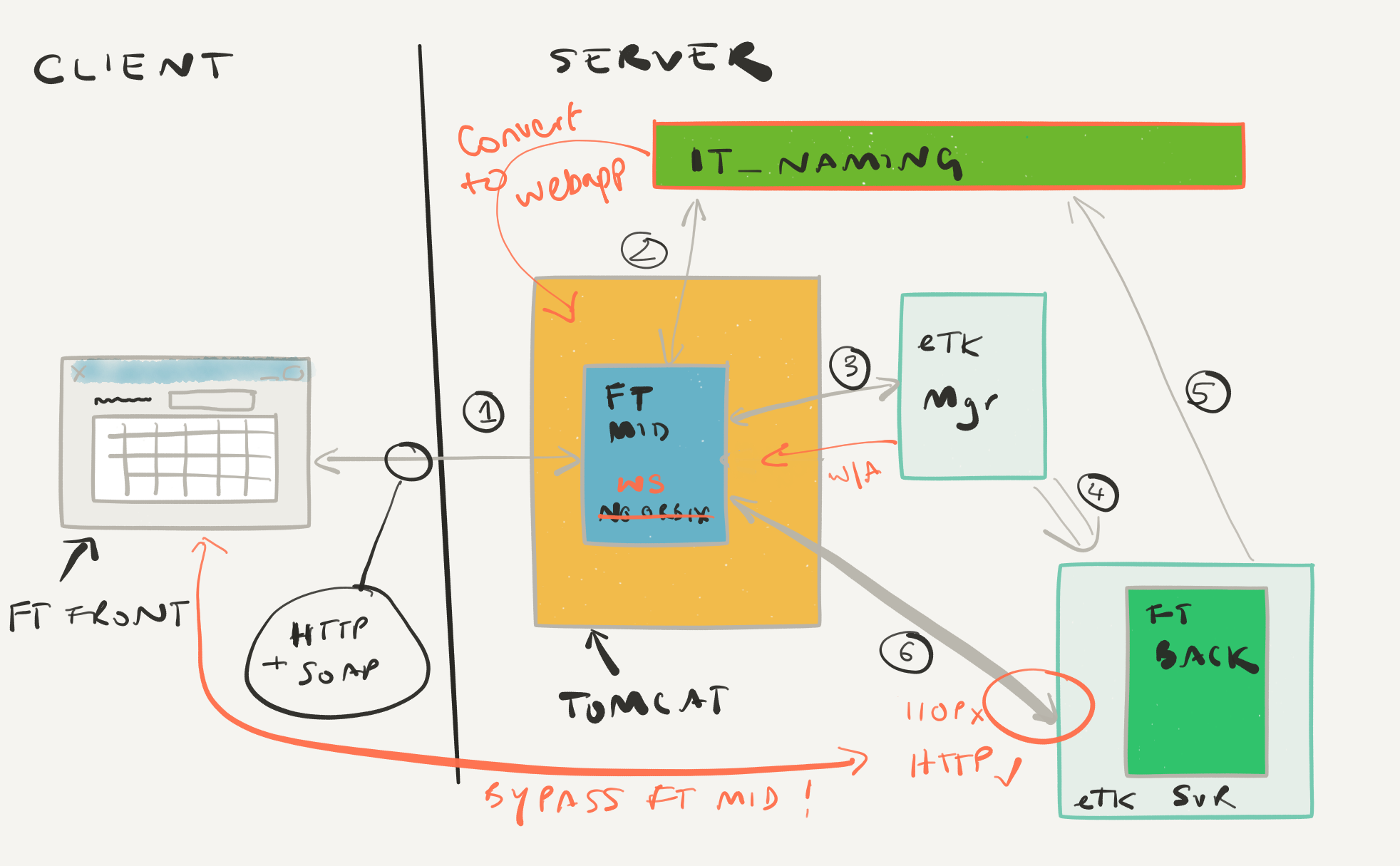
In FT there are three main logical parts:

  1. FT Front : This is C#/.NET screen that runs on the user Windows desktop, and is a thin GUI with limited business functionality.
  2. FT Back: This is the user’s proxy on the server side, and is an instance of the Summit Toolkit ( STK ) for the user. All the business logic and security code live here. This will be an eToolkit process.
  3. FT Middle: This is a web service handles the setup and maintenance of communications between FT Front and FT Back.

FT Front can locate FT Middle using the Environments.xml file which contains the URL for the FT Middle web service.

In an Orbix based environment, the FT Middle webapp is called ‘ft_middle_noorbix’ ( as in ‘No Orbix on the Client Side’ ). FT Front uses HTTP (ie. normal web requests) to communicate to FT Middle. After FT Front connects to FT Middle and requests a connection to FT Back, FT Middle has some work to do. It will

  1. Connect to the Orbix naming service, and locate a suitable eToolkitMgr process
  2. Connect to the eToolkitMgr and request an eToolkitSvr process
  3. Wait for the eToolkitMgr to confirm that the eToolkitSvr process has launched
  4. Poll the itnaming_daemon, waiting for the eToolkitSvr to register itself
  5. Connect to the eToolkitSvr process, then act as a proxy, translating the HTTP/SOAP protocol requests from FT Front into CORBA IIOP protocol requests for FT Back

Post Orbix FT

Without Orbix, the sequence of launching FT Back is basically the same. It’s just that without Orbix and the IIOP protocol none of the existing programs will work! We need new ones, and these new programs are already available in Summit 5.6 and 5.7 so feel free to experiment for yourself in a development environment. Here’s a handy map of the replacement components:

Orbix Post Orbix
ft_middle_noorbix (Webapp) ft_middle_ws (Webapp)
itnaming_daemon (Orbix process) SummitNamingService (Webapp)
etoolkitmgr_2k (Orbix server) ETKSessionService,ETKPoolService (Webapps)
etoolkitsvr_2k (Orbix server) etkservice (HTTP/SOAP server)

Tomcat services abounding

We’ve got a lot more Tomcat services in the architecture now. Previously, you needed Tomcat ( or another Webapp container ) to run the FT Middle webapp, but there’s another three services in the list above. Beyond this list, there’s at least another three services ( monitor, IDGenerator and SMT ) that you’ll want to run in version 6.0 as well. We’re probably going to get a few more Tomcat related issues in version 6.x compared to version 5.x and Summit IT teams are going to need to improve their Tomcat and Java skills. Fortunately, documentation is everywhere.

The ETKPoolService is going to be launching the etkservice processes, and, in the same way as etoolkitmgr_2k, will launch the process on the local machine. This is going to cause problems for you if your site uses a central Tomcat cluster, rather than running Tomcat on your Summit application servers. Corporate Farming of Tomcat servers probably isn’t going to work for you in version 6.x.

There will be some trial and error to determine the best practice for which webapps can or should be deployed into the same Tomcat process. A ‘one webapp per Tomcat process’ policy may be safe, but could lead to a lot of Tomcat processes taking up server memory. Some testing I did a while back ( admittedly in version 5.6 ) suggested that multiple ETKSessionService processes in the same Tomcat container did not play well together – so you would definitely need one Tomcat process per Summit environment. That may not be an issue in version 6.x.

Any existing load balancing solutions for ft_middle and etoolkit_mgr are going to need some consideration, and probably a bit of a rework during the V6.x upgrade process. I plan to look at this issue myself in a later blog post.

(Not) Lost in Translation

The new etkservice is much like the etoolkitsvr_2k process, except that it makes the Summit Toolkit available over HTTP rather than IIOP. FT Front talks HTTP too, so it is now possible for FT Front to connect directly to FT Back/etkservice without needing to have FT Middle in between acting as a translator. This significantly reduces the work that FT Middle has to do, and should ease the Tomcat load. This won’t work if you have network firewalls in place between FT Front and FT Back; in this case, you will still need to use FT Middle to act as a gateway, forwarding messages between FT Front and FT Middle.

Environments.xml is different

It’s the same file, and the same structure, but you will need to set the <ETKLocation> and <Firewall> tags for your new environments.

Embrace SMT

The Summit Management Tool ( SMT ) is the standard way of launching Summit services and setting up their environment. ETKSessionService and ETKPoolService need a suitable set of environment variables to launch etkserver processes, and they expect that file to appear from SMT. You probably won’t have to use SMT to manage your Summit environments, but it’s probably going to make life easier if you do use it.


I’d really recommend at least reading the documentation for these services – the Summit Distributed Components Guide is a good starting point — and trying them out for yourself in a test or development environment so you are ready for version 6.0 when it arrives. All of this could be rolled out into Summit 5.7 prior to a version 6.x upgrade, and aside from Summit Naming Service, you can the Orbix and Post-Orbix components together on the same environment as a transitional step.