
One of the key changes in the Summit V6.0 architecture we explored in the last couple of posts was that webapps and Tomcat are going to become significantly larger and more important part of the Summit infrastructure. It’s important for system stability and performance to get the deployment right, so we’ll start in this post by understanding what Tomcat does.
The Apache Tomcat website gives us a one sentence description:
The Apache Tomcat® software is an open source implementation of the Java Servlet, JavaServer Pages, Java Expression Language and Java WebSocket technologies.
If you are none the wiser after reading that, don’t worry – I’ll explain it. I’ll assume that you already understand what open source software is, but Java Servlet, JavaServer Pages, Java Expression Language and Java WebSocket technologies are going to need some explanation.
Background – A problem to solve
Back around the turn of the millennium, the internet was just taking off. The earliest web servers were designed to serve static content to web browsers. You stored a pile of .html and .gif files in a suitable directory, and your NCSA web server would send these files back to the browser as it requested them.
Static is fine for some content, but especially in the corporate world, the data that needs presenting is ever changing , so you need the ability to generate content dynamically. Back then, your options were limited, somewhat inflexible and slow. I remember generating dynamic content using Perl and cgi-bin in 1997, which did the job I needed – which was to add a corporate theme around some legacy system documentation, but was not particularly performant. CGI allows the web server to run an external program to generate a response, but the since the that program was loaded and launched for every web request, high volumes of traffic could quickly overload a server.
Inside an enterprise, if you wanted your browser to interface to your line of business applications, CGI was inadequate, and you needed something more.
Java EE – A solution
Nowadays, there are dozens, if not hundreds of viable solutions to generating dynamic web content, with different programming models, languages, feature sets and performance.
Sun released Java Enterprise Edition – JavaEE for short, on December 12, 1999. JavaEE provides an architecture and a family of protocols and technologies aimed at enterprises wanting to build Java applications. The reference implementation was written in Java, but alternative implementations of some of the protocols have been written in other languages. Java EE has an n-tier architecture, which is somewhat more sophisticated and complex than most dynamic frameworks, but which can map onto nearly any enterprise multi-tier client-server application.
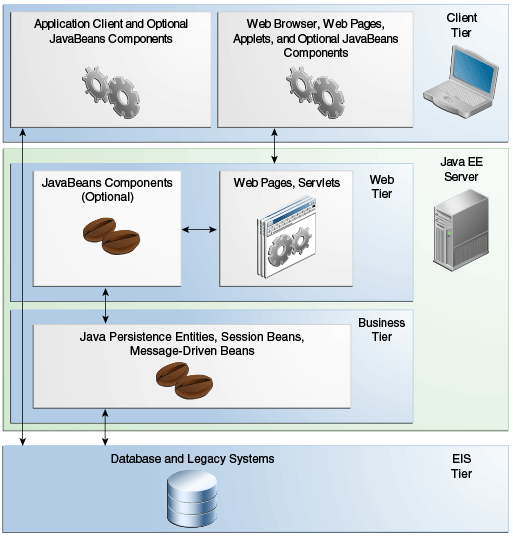
Summit doesn’t need to implement the whole Java EE setup, but makes use of the ‘Web Tier’ part of the architecture.
Like the Business Tier and, to some extent, the Client tier, the Web Tier consists of one or more containers. Tomcat is a Web Container.
The Web Tier
The Web Tier servers can be accessed via HTTP – and HTTP is very widely supported; not just by every web browser but also in client libraries for just about every programming language. This makes them ideal for implementing services which can be called remotely by a range of clients. Business Tier servers have more sophisticated and flexible programming models, but are only really supported by Java clients.
A Java EE Web Container has a list of 25 APIs to support. There two ‘key’ APIs : Java Servlet and JavaServer Pages and the remaining 23 – including Java Expression Language and Java Websockets — we will call ‘secondary’ and ignore for a moment.
There are at least a dozen other software packages that serve the same Web Container function – Summit supports Tomcat, IBM’s Websphere and Oracle’s Weblogic but Tomcat is used in every Summit installation I’ve seen because it is free, open source and distributed by Misys along with Summit.
A Servlet is a special Java class that implements the javax.servlet.Servlet interface. Servlets implement a request/response architecture – ie. you send the servlet a request, and you get a response back. The web container knows how to load Servlets, and can forwards requests onto them.
JavaServer Pages (JSP) is an alternative programming model where you write HTML pages and embed Java code inside them. The Web Container runs the embedded Java code to generate the dynamic HTML content before sending the results back to the client. Java Expression Language ( EL ) is a secondary API used by JSP to communicate with the business logic tier.
JSP and EL are irrelevant to us though, since all of the Summit webapps use the Servlet technology.
Servlets
The Servlet interface is pretty simple, and a Servlet has a simple life.
- The container loads the Servlet, and calls the servlet’s
init()function for one time setup. - For each client request, the container calls the servlet’s
service()function, passing in the request parameters, and getting the response back. - When the Servlet is not longer needed, the container calls the servlet’s
destroy()method, and unloads it.
This request/response architecture maps very nicely onto the internet HTTP protocol, so in practice most servlets are derived from the javax.servlet.http.HttpServlet class. This class already provides a service() method, and programmers override methods corresponding to one or more of the HTTP verbs such as doGet().
Here’s a simple servlet that will respond to any request with a web page showing the current date
import java.io.*;
import javax.servlet.*;
import javax.servlet.http.*;

public class TimeServlet extends HttpServlet {

    public void doGet( HttpRequest request, HttpResponse response)
        throws ServletException, IO Exception
   {
       response.setContentType("text/html");
       Date now = new Date();
       PrintWriter out = response.getWriter();
       out.println("<h1>" + now.toString() + "</h1>");
    }
}
It’s not actually important that you understand this code. What is important is that these 14 lines of code are all I need to write for my web based dynamic time display application. Tomcat does the rest.
The role of Tomcat
Tomcat fills out the rest of the code that makes up the dynamic web application. It provides the code to handle
- Opening a server socket to listen for HTTP
- Parsing HTTP requests from clients, and making sure they are valid and requesting something that I provide
- Switching over to WebSocket connections if the client requests it
- Sending the correct status codes when things go wrong ( or right! )
- Encrypting or decrypting HTTP traffic because we are using HTTPS
- Handling multiple connections at the same time
- Working out if a user should have permission to access my servlet
- Loading, initialising and unloading servlets
- Routing HTTP requests to the correct servlet
- Packaging responses back to client over HTTP
- Application logging
These are all common functions that any quality web server would need to support. It’s an awful lot of code to write yourself; the HTTP protocol itself has 3 versions (1.0, 1.1 & 2 ), a dozen or so verbs and over 50 different return codes to support for example. Having a widely used, heavily tested application framework to handle all that for you delivers greater stability and flexibility compared to rolling your own.
Now we know what Tomcat does : it’s a web server that allows me to generate responses with blocks of Java code.
Now you just need to configure it all to work for you – and that’s next weeks instalment…
Further Reading
If you want to know more about Java EE in general, the Oracle Java EE tutorial is a very good place to start. The Tomcat Website contains an overview of Tomcat and configuration documentation.