Misys FusionCapital Summit version 6.0 has now been released. A new major version number means that that there has been a pretty major change in the architecture of the system : Version 3.0 brought the Straight Through Processing architecture, and Version 5.0 brought us Summit FT. The big change in version 6.0 is ‘The end of Classic’.
At first sight, I though this just meant that the 20 year old, Motif based GUI would be properly gone, but with the removal of Orbix as well, far more has been removed than some user screens, and sites moving to Version 6.0 are going to have to make some significant architectural changes. I’ll discuss the changes to Payments, Documentation and STP processing in Part 2. In this part, I’ll discuss the changes to the front end.
The removal of the Classic, Motif based GUI code has been long promised by Misys, and nearly everyone has now converted over to the Summit FT .NET front end. Indeed, many newer deployments have never seen the sal_menu ( or stk_menu – remember that ) in action. If you haven’t replaced Classic yet, you won’t have a option to keep it after upgrading to 6.0. This makes life for Misys much simpler, and a large chunk of legacy GUI code can be deleted from the codebase, and there is no longer any requirement to develop and test GUI screens twice. The Summit FT front end is more functional, better supported internally and better looking than the Classic GUI.
Summit FT deployments are going to have to change too, as Orbix is no longer part of Version 6.0. This is a Good Thing. Choosing Orbix was a reasonable decision in the late 1990s: if you wanted something that would enable remote service discovery and inter server message passing, CORBA in the form of Orbix was pretty much the only option back then. The problem is that Orbix is a very capable, highly configurable, sophisticated remote object manager with a high price tag. Summit only needs a small fraction of the total functionality, but when Orbix isn’t working, you need to grok a whole lot of the complex Orbix architecture and configuration before you can fix anything. In the two decades since Orbix was chosen, the Internet has exploded, and processes and protocols have which are simpler, more widely used and far better documented and supported. If Tomcat doesn’t start, search Google and find an answer. If itnode_daemon.exe doesn’t start, search Google and discover all about Node.js.
Let’s have a look at the FT architecture and how it changes without Orbix.
FT Architecture
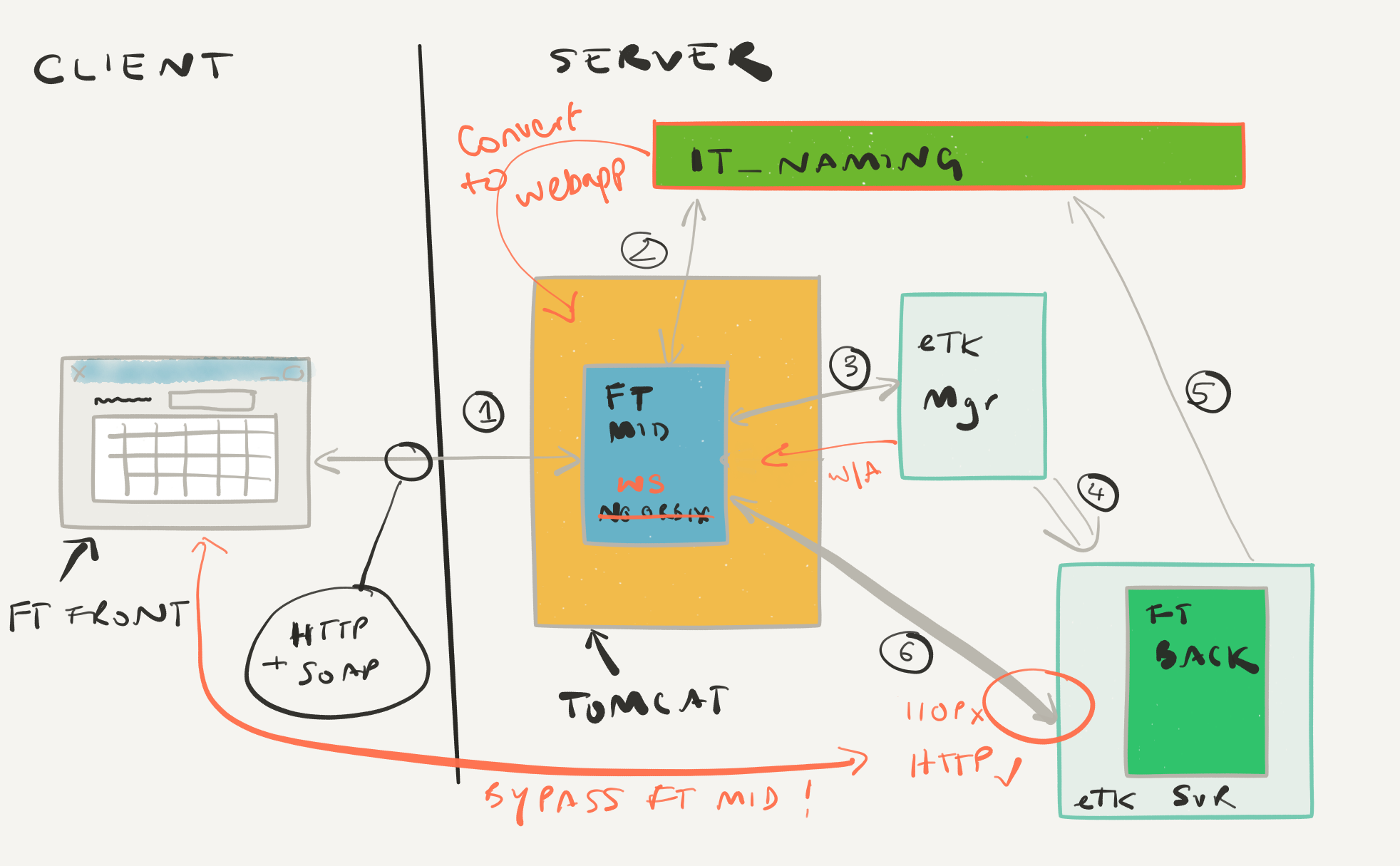
In FT there are three main logical parts:
- FT Front : This is C#/.NET screen that runs on the user Windows desktop, and is a thin GUI with limited business functionality.
- FT Back: This is the user’s proxy on the server side, and is an instance of the Summit Toolkit ( STK ) for the user. All the business logic and security code live here. This will be an eToolkit process.
- FT Middle: This is a web service handles the setup and maintenance of communications between FT Front and FT Back.
FT Front can locate FT Middle using the Environments.xml file which contains the URL for the FT Middle web service.
In an Orbix based environment, the FT Middle webapp is called ‘ft_middle_noorbix’ ( as in ‘No Orbix on the Client Side’ ). FT Front uses HTTP (ie. normal web requests) to communicate to FT Middle. After FT Front connects to FT Middle and requests a connection to FT Back, FT Middle has some work to do. It will
- Connect to the Orbix naming service, and locate a suitable eToolkitMgr process
- Connect to the eToolkitMgr and request an eToolkitSvr process
- Wait for the eToolkitMgr to confirm that the eToolkitSvr process has launched
- Poll the itnaming_daemon, waiting for the eToolkitSvr to register itself
- Connect to the eToolkitSvr process, then act as a proxy, translating the HTTP/SOAP protocol requests from FT Front into CORBA IIOP protocol requests for FT Back
Post Orbix FT
Without Orbix, the sequence of launching FT Back is basically the same. It’s just that without Orbix and the IIOP protocol none of the existing programs will work! We need new ones, and these new programs are already available in Summit 5.6 and 5.7 so feel free to experiment for yourself in a development environment. Here’s a handy map of the replacement components:
| Orbix | Post Orbix |
|---|---|
| ft_middle_noorbix (Webapp) | ft_middle_ws (Webapp) |
| itnaming_daemon (Orbix process) | SummitNamingService (Webapp) |
| etoolkitmgr_2k (Orbix server) | ETKSessionService,ETKPoolService (Webapps) |
| etoolkitsvr_2k (Orbix server) | etkservice (HTTP/SOAP server) |
Tomcat services abounding
We’ve got a lot more Tomcat services in the architecture now. Previously, you needed Tomcat ( or another Webapp container ) to run the FT Middle webapp, but there’s another three services in the list above. Beyond this list, there’s at least another three services ( monitor, IDGenerator and SMT ) that you’ll want to run in version 6.0 as well. We’re probably going to get a few more Tomcat related issues in version 6.x compared to version 5.x and Summit IT teams are going to need to improve their Tomcat and Java skills. Fortunately, documentation is everywhere.
The ETKPoolService is going to be launching the etkservice processes, and, in the same way as etoolkitmgr_2k, will launch the process on the local machine. This is going to cause problems for you if your site uses a central Tomcat cluster, rather than running Tomcat on your Summit application servers. Corporate Farming of Tomcat servers probably isn’t going to work for you in version 6.x.
There will be some trial and error to determine the best practice for which webapps can or should be deployed into the same Tomcat process. A ‘one webapp per Tomcat process’ policy may be safe, but could lead to a lot of Tomcat processes taking up server memory. Some testing I did a while back ( admittedly in version 5.6 ) suggested that multiple ETKSessionService processes in the same Tomcat container did not play well together – so you would definitely need one Tomcat process per Summit environment. That may not be an issue in version 6.x.
Any existing load balancing solutions for ft_middle and etoolkit_mgr are going to need some consideration, and probably a bit of a rework during the V6.x upgrade process. I plan to look at this issue myself in a later blog post.
(Not) Lost in Translation
The new etkservice is much like the etoolkitsvr_2k process, except that it makes the Summit Toolkit available over HTTP rather than IIOP. FT Front talks HTTP too, so it is now possible for FT Front to connect directly to FT Back/etkservice without needing to have FT Middle in between acting as a translator. This significantly reduces the work that FT Middle has to do, and should ease the Tomcat load. This won’t work if you have network firewalls in place between FT Front and FT Back; in this case, you will still need to use FT Middle to act as a gateway, forwarding messages between FT Front and FT Middle.
Environments.xml is different
It’s the same file, and the same structure, but you will need to set the <ETKLocation> and <Firewall> tags for your new environments.
Embrace SMT
The Summit Management Tool ( SMT ) is the standard way of launching Summit services and setting up their environment. ETKSessionService and ETKPoolService need a suitable set of environment variables to launch etkserver processes, and they expect that file to appear from SMT. You probably won’t have to use SMT to manage your Summit environments, but it’s probably going to make life easier if you do use it.
I’d really recommend at least reading the documentation for these services – the Summit Distributed Components Guide is a good starting point — and trying them out for yourself in a test or development environment so you are ready for version 6.0 when it arrives. All of this could be rolled out into Summit 5.7 prior to a version 6.x upgrade, and aside from Summit Naming Service, you can the Orbix and Post-Orbix components together on the same environment as a transitional step.